
Pour continuer la lecture
Auth is a Dumpster Fire. Can 'Better Auth' Put It Out?
19 juillet 2025
They Said It Would Burn: Tales from the Trenches of PC Enthusiasm
15 juillet 2025
Your Own Personal Jarvis (or maybe just a Smart Teacup): Building a Local, Private LLM
18 juin 2025
Mastering State and Data Synchronization in Modern React Applications
17 juin 2025
Unifying Two Sites Under a Single Domain with CapRover: A Seamless Integration Guide
2 juin 2025
How to Monitor All SSH Connections Through Discord? 🚀🌟
Imagine having a digital watchdog that keeps an eye on SSH connections to your server, alerting you on Discord every time someone logs in. Sounds cool, right? Let’s set this up and add an extra layer of awareness to your server's security !
🕵️ Step 1: Summon Your Discord Webhook
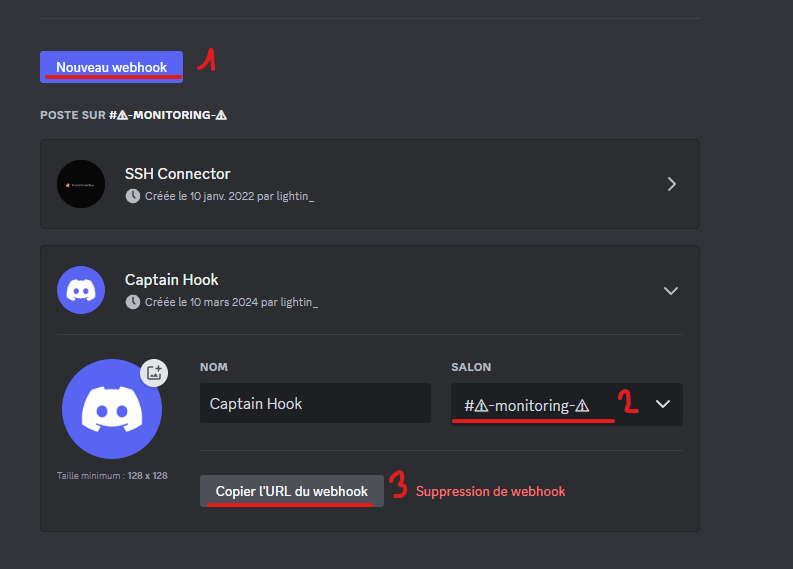
Before we unleash the magic, we need to create a Discord webhook. Think of it as recruiting a digital messenger.
Enlist Your Messenger
- Dive into Discord: Choose your preferred updates channel, and hit Edit channel > Integrations.
- Webhook Initiation: New to webhooks? Click Create Webhook. If you're a veteran, select View Webhooks then New Webhook.
- Craft an Identity: Give your webhook a catchy name and an avatar.
- Secure the Communications: Copy the WEBHOOK URL; it’s the key to your direct line.
- Save the Day: Make sure to hit Save.

🚀 Step 2: Dive into Your Server
Gear up for some command-line action. SSH into your server to start setting up our digital watchdog.
🌟 Step 3: The Spellbook - Create a Script
Now, we're crafting a spell in the form of a script named ssh-check.sh.
The Incantation
#!/bin/bash

# Your secret communication line
DISCORD_WEBHOOK_URL="https://discord.com/api/webhooks/XXXXXXXXXX/XXXXXXXXXXXXXXXX"

# Detect the intruder... I mean, the guest
IP=$(echo $SSH_CLIENT | awk '{print $1}')
curl -H "Content-Type: application/json" -X POST -d "{\"content\": \"SSH connection from IP: $IP\"}" "$DISCORD_WEBHOOK_URL"
Unlock the Code: Swap in your unique webhook URL here.
This enchantment alerts you with the IP address of every connecting soul.
⭐ Step 4: Awaken the Spell
Give life to your script, making it a vigilant guardian:
sudo chmod +x ./ssh-check.sh
🎥 Step 5: The Guardian's Post - Modify SSH Config
Let’s ensure our guardian watches over every entrance:
vim /etc/ssh/sshd_config
📝 Feel free to use your favorite text editor. If
vimfeels like ancient runes, trynano.
Whisper this at the file’s end:
ForceCommand /path/to/ssh-check.sh && /bin/bash
⚠️ WARINING ! If you dont have
bash, setup correctly the path to your shell, otherwise you will not be able to connect to your shell with ssh
❤️ Step 6: Awaken the Guardian
Revive the SSH service to embrace the new guardian:
systemctl restart sshd
🚪 I advise you to NOT close your current connection right now ! Try to connect to your server with another terminal first to ensure everything work.
🌍 Step 7: Revel in Your Fortress
Congratulations! You’ve transformed your server into a digital fortress, with alerts for every SSH connection sent straight to your Discord. Your server is not just secured; it’s connected.
